Discover the benefits of using Responsive Display Ads (RDAs), also called Google Responsive Ads, in marketing campaigns. Learn how these adaptable and effective ads work, their benefits, and a lot more.
Google responsive ads have been around for a while now. These ads can resize themselves automatically according to the space available and are, therefore, significantly popular among advertisers.
Gauging the demand for responsive ads, Google in 2016 launched responsive display ads (RDA) to replace the need to create responsive ads manually.
Since then, these ads have rapidly gained popularity, becoming a significant trend in advertising. According to One Hour Professor, advertisers see twice the conversion rates on average when responsive ads are added to an ad group with a static display ad.
Moreover, a Google study has shown that responsive display ads (RDA) achieve up to 10% more clicks and conversions.
In this blog, we will cover the ins and outs of Google responsive display ads.
What Are Responsive Display Ads?
Google Responsive Display Ads (RDA) are a multifaceted format designed to seamlessly adjust their specifications and integrate across ad spaces in the Google Display Network (GDN).
Advertisers using Google Ads are not required to test multiple headlines, images, descriptions, and logo combinations to get the best performing display ad; RDA can do all that for them.
- With Google responsive ads, if you wish to show ads on the desktop and smartphone, you don’t need to design two different ad units.
- You can simply create ads using the responsive ad feature, and the ad units will resize accordingly for both devices.
Why Do We Need Google Responsive Ads?
Users consume information using many devices such as desktops, laptops, tablets, and smartphones. And all these devices have different resolutions and display sizes.
Publishers sell ad slots in a variety of sizes, too. For the advertiser, this means spending more creative resources and time trying to create all possible permutations and combinations of ads.
Displaying a creative design meant for PC on a smartphone will negatively impact the user experience. This is why we need RDAs.
Google launched RDA because it knows how valuable this tool is, and publishers are already embracing it. Also, reports show that marketers using responsive display ads have seen a 10% increase in conversion.
Sounds like a win-win situation.
Now that you know what Google responsive display ads are, let’s take a deep dive into how they work.
How do Responsive Display Ads work?
As Google says, “We built responsive ads for display to help your ads adapt to the increasingly diverse mix of content types and screen sizes.”
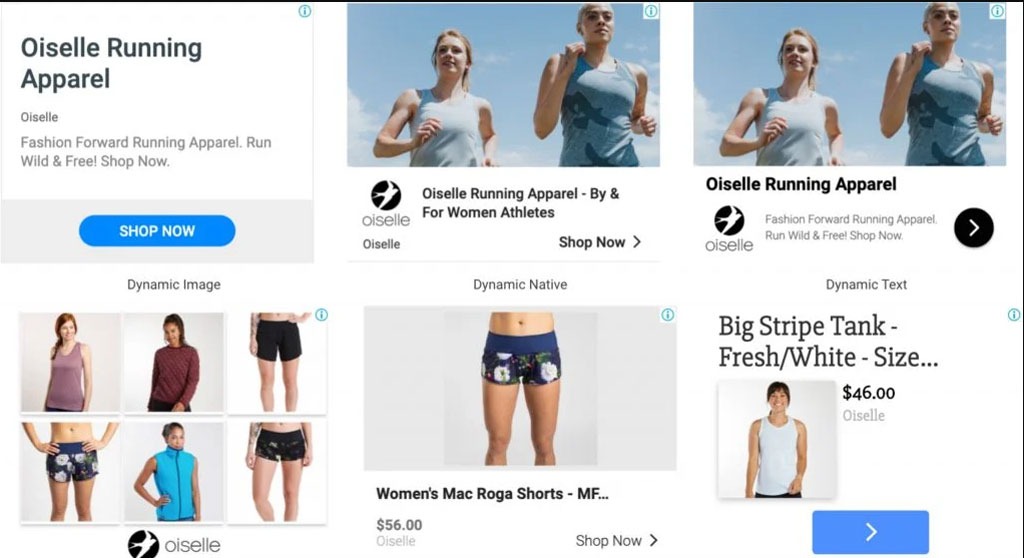
Google responsive display ads are asset-oriented ads. Assets are various elements that make up an ad, such as images, text, and logos. The GDN (Google Display Network) algorithm analyzes each ad space and accordingly creates combinations with the available elements to display the most relevant ad format to the user.
Now, depending on the device the user is using and the website, the same ad can be displayed as a native ad or a simple display ad. Moreover, the algorithm optimizes the ad layout based on performance data. It also utilizes A/B testing to create the right combination for the right user, making the ads more user-friendly.
Examples of Responsive Display Ads
If you still have not got the hang of RDAs, let’s understand it with some examples.
1. COSMEDIX

Cosmedix, a beauty company, employed Google responsive display ads that showcase automatically generated videos. By integrating clear CTAs and vivid visuals, their conversion rates increased by 5%.

Dynamic Display Ads by Cosmedix
2. Bloomberg Media

Bloomberg Media, a US-based newsroom, decided to test two ad formats – static ads and responsive display ads. They aimed to integrate the one with the most conversions in their future campaigns.
Post-testing, the results showed that responsive display ads outperformed static ads, with an 81% lower cost-per-site visit and an 8% lower cost-per-action.
3. Lexus


Lexus, a luxury car brand, employed Google responsive ads to market its latest innovation: the Lexus ES’s new speaker system. However, unlike the two brands we discussed above, Lexus chose a different route. It employed RDAs to invoke curiosity among its target market by using enigmatic visuals of human eyes.
Here are a few more examples to help you better understand Google responsive display ads.
3 Visual Examples of Google Responsive Ads
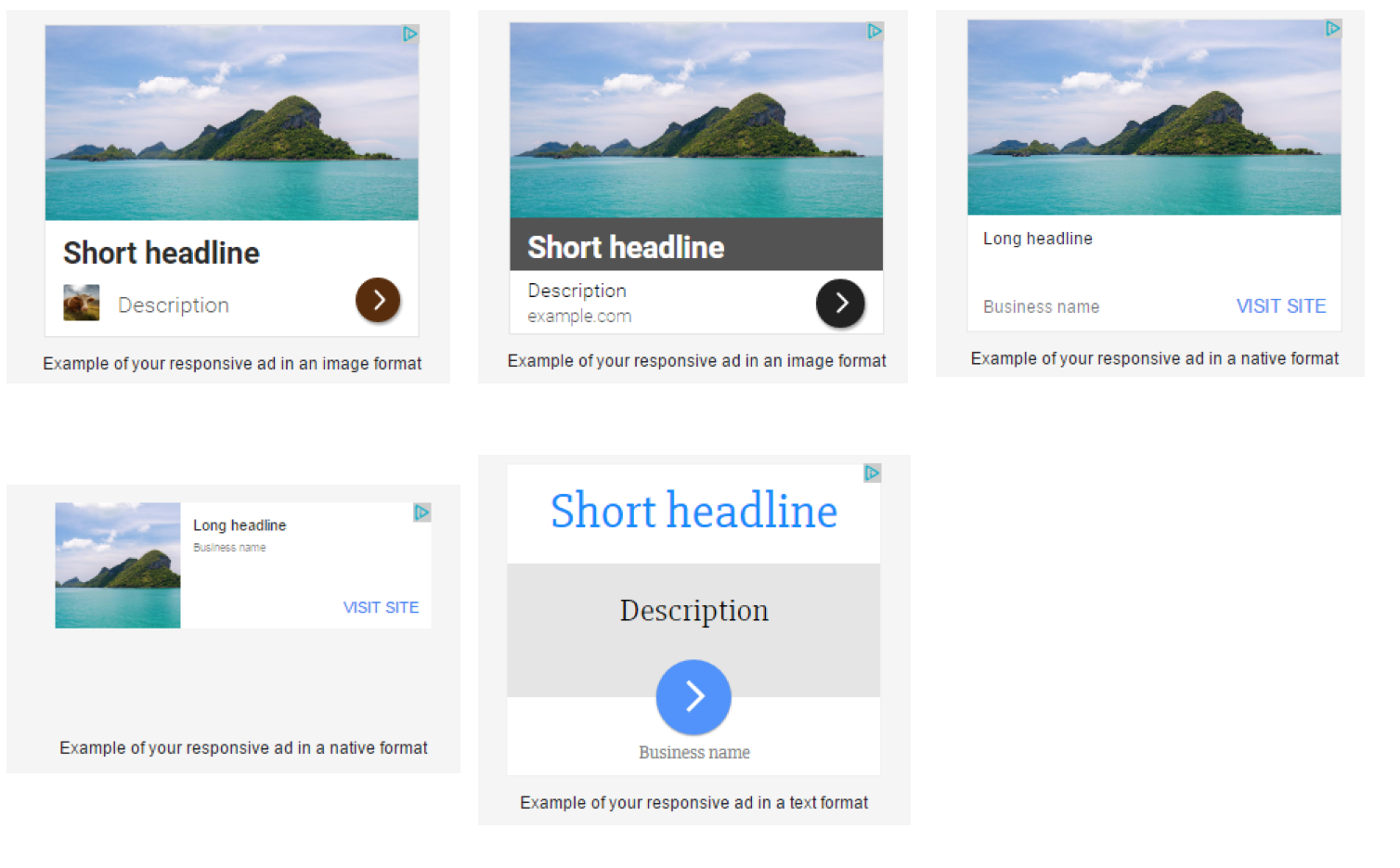
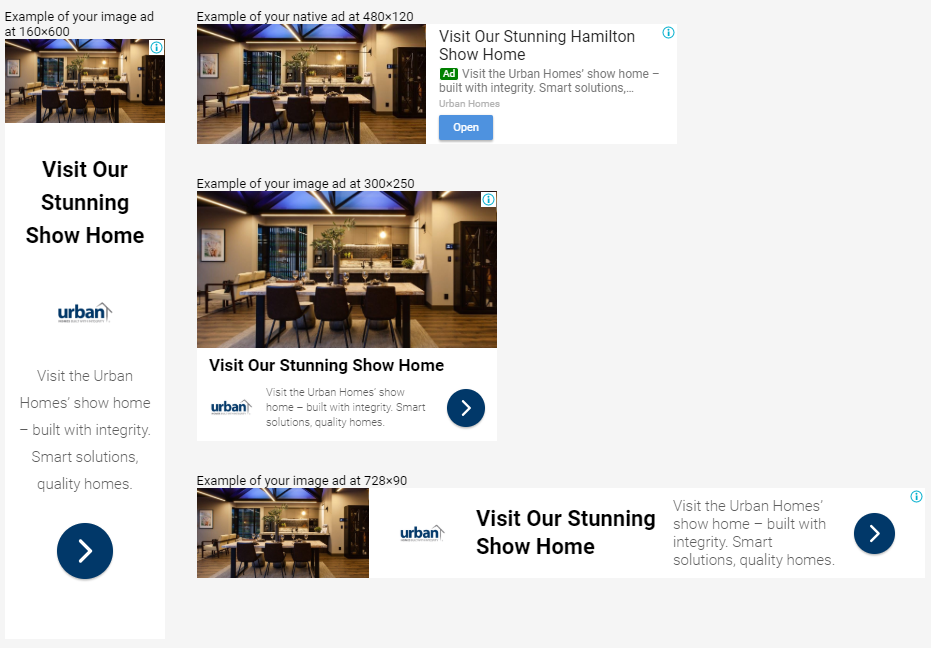

As you can see, the same description has been used with multiple headlines and is fit to the different sizes appropriately, giving a better look and feel to the website without impairing the user interface and user experience.
How to Set up Responsive Display Ads?
Setting up your responsive display ad campaigns is not so complicated until you know precisely how it’s done. Here are a few simple steps you can follow to create your ad campaign.
1. Login to your Google Ads Account.
2. Navigate to Campaigns icon > Campaigns > Ads.
3. Click on the “+” button and select “ Responsive Display Ads”.
4. Select the ad group where you want your ads to appear: “Websites & Apps” or “Gmail & Youtube”.
5. Populate the following fields to create your ad setup:
- marketing_images
- square_marketing_images
- headlines
- long_headline
- descriptions
- business name
6. Complete the process by adding the final URL, CTA, and promotional text.
7. Once done, preview the ad sizes and formats to see how they would be displayed across the Google Display Network.
So that was all you needed to set up your responsive display ads campaign. However, constant monitoring and making required changes are essential to make the most out of your Google responsive ads campaign.
Common Sizes for Responsive Display Ads
Here are some common sizes for Google responsive display ads for mobiles and desktops.
1. Mobiles

2. Desktops

Google Responsive Ads Specs
There are certain specifications that a marketer should keep in mind while creating RDAs. Here are three tables summarizing the specs.
1. Text
| Type | Maximum length | Quantity | Required |
| Headlines | 30 characters | 1-5 headlines | ✓ |
| Long headline | 90 characters | 1 headline | ✓ |
| Descriptions | 90 characters | 1-5 descriptions | ✓ |
| Business name | 25 characters | 1 name | ✓ |
| Call to action | Automated | 1 call to action | ✓ |
2. Image
| Ratio | Recommended size | Quantity | Required |
| Horizontal1.91:1 | 1200 x 628 pixels(min 600 x 314 pixels) | 1-15 imagesRecommended: 5 | ✓ |
| Logo1:1 | 1200 x 1200 pixels(min 128 x 128 pixels) | 1-5 imagesRecommended: 1 | ✓ |
| Logo4:1 | 1200 x 300 pixels(min 512 x 128 pixels) | 1-5 imagesRecommended: 1 | ✕ |
| Square1:1 | 600 x 600 pixels(min 300 x 300 pixels) | 1-15 imagesRecommended: 5 | ✓ |
3. Videos
| Ratio | Recommended length | Quantity | Required |
| Horizontal16:9 | AnyPreferred: 30 seconds | 1-5 videosRecommended: 2 | ✕ |
| Square1:1 | AnyPreferred: 30 seconds | 1-5 videosRecommended: 2 | ✕ |
| Vertical2:3 | AnyPreferred: 30 seconds | 1-5 videosRecommended: 2 | ✕ |
Pros and Cons of Google Google Responsive Ads
Now that we have covered the basics, let’s explore the pros and cons of Google responsive ads and try to understand whether it’s a good fit or not.
Benefits of Responsive Display Ads
- Ideal for small to mid-sized businesses that lack resources for dynamic advertising
- Saves time and resources by using advanced algorithms and machine learning to adjust the size/format of the ads according to the device and user demography
- Makes campaigns more effective, leading to more conversions on a similar pricing model
Drawbacks of Responsive Display Ads
- Offers limited control over ad creatives and their appearance, hence leaving no room for customization.
- No distinguishing branding can take place with RDAs, and they are created using general templates without user or brand-specific customizations.
- Reduced insight into campaign performance as combination-wise metrics are not provided by Google.
Best Practices for Responsive Display Ads
1. Properly Use Headlines and & Text Variants
Google responsive ads allow you to advertise your products/services to spread your message across multiple headlines and descriptions. But there are specific parameters that we have already mentioned above to be used.
Furthermore, it’s important to note that the two headline fields in the setup page will not be displayed simultaneously to users. This means that you don’t need to try and cram all your information into each headline field.
Instead, you can use them to reframe your message and make it more engaging. By doing so, you can create a more effective and impactful ad that catches the attention of your target audience.
2. Wisely Use Images
There are plenty of factors you should keep in mind when designing and posting images for Google responsive ads. Here are a few of them:
- Upload high-quality images of multiple sizes, ideally optimized using an image editor
- Don’t use text over images to avoid getting penalized.
- Use all image fields to reach as many users as possible.
If you don’t have high-quality images, consider using an AI image generator like Depositphotos AI Image Generator to create new ones.
3. Utilize the Videos
Even the most engaging Google Ads image material may fall short of video, making this type of content perhaps one of the best deploys. With RDA, you can even add videos to the mix for enhanced user engagement and conversions. Using an animated video maker allows marketers to craft visually appealing content that stands out in Google Ads campaigns.
Uploaded Ads vs Display Ads: Which One Is Better?
Before we get to what performs better, let’s find out what are uploaded ads.
What are Uploaded Ads?
Unlike RDA, uploaded ads are created by an advertiser and uploaded to a particular platform or network, such as Google Ads or Facebook Ads.
Uploaded ads can come in various formats, including static images, animated images, videos, and text-based ads.
Once uploaded, the advertiser can target the ads to a specific audience based on various criteria, such as location, interests, demographics, and behavior. These kinds of ads are usually pre-designed and do not adapt to different ad sizes or placements.
Does it Perform Better than Google Responsive Ads ?
Choosing between uploaded ads and display ads depends on the advertising goals and the specific needs of a business.
- Uploaded ads are useful for businesses that want to create specific ad designs or have existing creative assets that they want to use in their ads.
- Uploaded ads can be effective in reaching a specific target audience and driving specific actions such as clicks, conversions, or leads.
- On the other hand, display ads can yield better results for businesses who want to reach a wider audience and maximize their reach.
- RDAs can adapt to different ad sizes and placements, making them more flexible and easier to manage.
This can help businesses save time and resources, while still achieving their advertising goals.
Key Takeaways on Responsive Display Ads
1. Responsive display ads, which integrate visual components and text in an eye-catching manner, are frequently found at the top or sides of webpages, as well as various locations on platforms such as social media and apps.
2. Google responsive ads automatically adapt their size, appearance, and format across devices and placements.
3. Creating RDAs: Campaigns > Ads > Responsive Display Ads > Ad Group Selection > Adding elements & other requisites > preview.
4. RDAs are ideal for small to mid-sized businesses that can’t afford the resources to customize each ad creative for the user. It utilizes advanced machine learning to show template-based ad sizes according to the user’s device. This, in turn, leads to more conversions on a similar pricing model.
Are you a publisher looking to optimize your ad revenue? Contact AdPushup, a Google-certified Publishing Partner, and avail a free demo.
Frequently Asked Questions – Responsive Display Ads
A responsive display ad is an ad format that adjusts its size, format, appearance, and other aspects to fit the available ad space on the website or app where it is displayed.
An advantage of responsive display ads is that they are flexible and can adapt to different ad sizes and placements, making it easier for businesses to manage their ad campaigns and reach a wider audience.
The main difference between display ads and responsive display ads is that display ads have fixed dimensions, while responsive display ads are adaptable and can adjust their size and format to fit the available ad space, creating a seamless experience for the user.
A characteristic feature of RDA is its ability to create ads that would fit an available ad slot on the user’s screen.