Malvertising is a kind of Cyberattack that can cause serious damage to your website. Publishers need to be aware of malicious advertising, as it can be spread through advertisements, exploit users and compromise the website’s authority.
With the worldwide financial impact of cybercrime expected to reach more than $10.5 trillion by 2025, publishers are expected to keep their sites safe and secure for users. Because if they fail to do so, it opens the door to cyberattacks like Malvertising or malicious advertising. Malvertising is a kind of cyber attack where legitimate online advertisements are injected with a harmful code that can trick users by redirecting them to fraudulent websites.
In this blog, we’ll understand what is Malvertising, how it works, common ways Malvertising happens, real-life Malvertising examples and how to prevent Malvertising.
What is Malvertising?
Malvertising or malware advertising is a type of cyberattack where a harmful code is injected into authentic advertisements. These ads act as a deception, leading users to unsafe destinations, putting their online security at risk.
The malvertising definition highlights how these malicious advertisements often go unnoticed by users and even publishers, putting every page viewer at risk of getting infected.
How Malvertising Works
Let’s understand how malware advertising operates as a cyber threat by sneaking through legitimate ad exchanges and ad networks without getting detected.
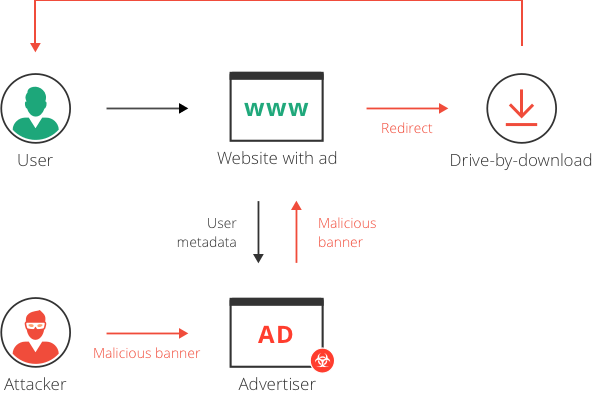
- Malvertising consists of harmful ads that blend with any other ads on the platform, making them difficult to detect.
- When users click on these ads unknowingly, the malware automatically gets executed upon the webpage, downloading harmful scripts or redirecting users to a fraudulent website.
- Once installed on a user’s device, malware can damage system files, filter the data, establish access points for hackers, and track users’ sensitive information.
Malvertising vs Ad Malware
Malvertising is a form of malicious advertising where harmful code is injected into ads, exposing users to malware. Meanwhile, adware gets installed on a user’s device and displays illegitimate ads, often without the user’s consent.
Even though malvertising and ad malware sound similar to each other, their mechanisms and impact on users are significantly different.
| Feature | Malvertising | Ad Malware (Adware) |
| Definition | Malicious ads are injected into legitimate ad networks, often redirecting users to harmful sites. | Unwanted software that installs on a user’s device and displays unwanted ads. |
| Delivery Method | Embedded within legitimate ads shown on websites. | Installed on the user’s device, often bundled with other software. |
| User Interaction Requirement | No, ads may activate malware even without clicking on them. | Yes, users may accidentally install adware through software downloads. |
| Impact on User | Users get redirected to dangerous sites, install malware, and steal data. | It displays intrusive ads, slows system performance, and collects browsing data. |
| Longevity | Disappears once the user leaves the infected webpage. | Continues to run until removed from the device. |
| Target Audience | Website visitors on infected publisher sites. | Individual users who unknowingly install the software. |
| Outcome | Can steal sensitive information, encrypt data for ransom, or sell data. | Collects user data for targeted ads, may sell user browsing behaviour insights. |
| Removal Methods | Strengthening ad network security, scanning webpages for threats. | Using antivirus tools, manually uninstalling the software, or resetting browser settings. |
Effect of Malvertising
Now that we’ve covered what is malvertising, let’s explore its impact on both publishers and users
On Publishers
Malvertising has a direct impact on the website revenue of publishers. There are two major ways in which malvertising affects publishers:
- Loss of Revenue: Even the biggest publishers across the world aren’t immune to malvertising. All kinds of publishers rely on money earned through advertising as the primary revenue source. If users start installing ad blockers, the advertising-based revenue will inadvertently go down. This directly impacts publishers’ ad revenue.
- Loss of Traffic: If a publisher’s website regularly serves malicious ads, users refrain from coming to the website. This leads to traffic decline, eventually also damaging publishers’ reputations.
On Users
Users who are impacted by malicious ads are affected differently based on the type of malvertising they come across:
- One stealthy method that is very penetrable and commonly used is drive-by download attacks. They happen due to a lack of security in the user’s browser, and install malware or adware directly into the system without any user action.
- Another common impact of malvertising is forced redirects, where users are involuntarily redirected to a fraudulent website consisting of phishing scams, harmful software downloads or fake content.
- Commonly, malvertising uses JavaScript to inject the unwanted ads beyond the originally intended ads, compromising the authenticity and security of the website.
7 Common Malvertising Methods to Watch Out
There are many different ways in which malvertising activities take place. Malicious code can be added in many ways by an attacker. Some of these ways are as follows:
- In Ad Calls: Whenever a user enters a publisher’s website, AdExchange pushes ads to the ad inventory of the website through third-party vendors. Here, an attacker can easily compromise any of these vendors, thus being able to inject malicious code.
- In Ad Creatives: Malicious code can come embedded in a banner ad. This is ordinarily done by injecting malicious code whenever a banner ad is a combination of images and JavaScript.
- Landing Page Malvertising: Often, landing pages contain malicious code. Users reach these landing pages by clicking on ads on a different website.
- Through Post-Clicks: When a user clicks a malicious ad, their request is often routed through several URLs before the original landing page. If any of these link is compromised, it can inject a harmful code into the user’s system leading to various malware downloads, unauthorized data collection, etc.
- Within a pixel: Pixels are small pieces of code embedded within ads or landing pages to track user journey and collect data for analytics. Even though, legit pixels only take necessary data, cybercriminals can hijack these pixels and intercept the delivery path for the data.
- Video Malvertising: Cybercriminals can spread malware through video formats very easily. There are two common methods:
- Video Ads: Standard video ad formats like VAST can have some third party pixels that can infect video ads and lead users to harmful sites or trigger a security breach. To prevent this user should interact with video players with in built malware protection.
- Flash Based Videos: This additional threat can embed inline frames or iframes that can download malware without any user interaction.
How to Remove Malvertising
Naturally, publishers are looking for solutions to understand how to prevent malvertising.
Identification in the beginning saves a lot of time in recovering revenue losses caused by malvertising. Many ad servers now come with an in-built scanner that identifies malicious ads. Note that these scanners aren’t 100% effective and can also miss out on certain malware. There are few integrated solutions in the market which publishers can use. One of them being Acronis Cyber Protect platform. These platforms can help identify and isolate malicious ad scripts before they spread, reducing the risk of revenue loss and data compromise.
Since Google Ad Manager is the most popular ad server, we have covered its mechanisms for preventing malvertising:
- Penalizing Authorized Buyers: Sometimes, authorized buyers can also get associated with approving malvertisements. If Ad Manager’s malware scanning tools identify malvertising activity from an authorised buyer, Google immediately suspends the buyer for three months.
- SafeFrame: Forced redirect ads have often disrupted user experience and have made users install ad blockers to prevent this activity. Google Ad Manager developed SafeFrame technology to deal with this. SafeFrame is turned on by default for custom and third-party creatives.
Google also encourages publishers to establish the authenticity of their advertising partners in order to prevent malvertising.
Here’s how Google Ad Manager helps:
Ad Manager also scans creatives to check if they are violating Google’s policies. If publishers want to bring traffic to these creatives, here’s how they can do it in Ad Manager:
- Sign in to your Google Ad Manager account.
- Click on Delivery >> Orders
- Apply filters such as Policy Violations to see which creatives have been flagged for violating Google’s policies.
Once the creative that violates policies is found, head over to the Creative Details Page. A yellow box there lists down what is causing the policy violation. Premium Ad Manager users can also view the domains associated with this violation.
Here are two ways in which publishers can fix this issue:
- Remove the domains associated with this creative that are causing malvertising activities.
- Contact the SSP or ad network if the creative has been obtained from them. Ask them to block or remove this creative and stop any creatives that lead to the domains that cause malvertising.
Bonus Tip:
Publishers can also make use of Google’s Safe Browsing Diagnostic Tool to regularly check if any pages are listed as malicious pages. This isn’t a completely foolproof tool, but it is still a good way to identify and remove malvertising on a website. The tool can be accessed here.
Malvertising Ad Campaign Examples
Here are some malvertising examples that have been carried out in the past:
Unanimis Malicious Ad Campaign
This occurred with the official website of the London Stock Exchange. For several hours, their website served a malicious ad, which was later found to be coming from Unanimis, an ad network owned by the Orange France Telecom Group. This malvertising ad campaign affected many high-profile users and rendered their systems defunct with malware.
RoughTed Malvertising Campaign
In June 2017, it was reported that a malvertising campaign titled RoughTed was infecting publishers’ websites. It was later revealed that approximately 28% of the organizations worldwide were directly impacted by it.
Spotify Malvertising
The popular music app has been linked with malvertising in the past. In 2016, Spotify served malicious ads to all its users who were using the free version of the app. The malicious ads spread regardless of the devices on which users were running the Spotify app.
Key Takeaways (Quick Summary)
- Malvertising is a hard-to-detect, deceptive form of cyberattack where the malicious ads blend with authentic ads, breaching user security.
- Users are severely impacted by Malvertising, as it can lead them to unethical websites, install malware in their systems and steal sensitive data just by a mere click on the ad,
- Websites that are infested with malware often experience decline in the traffic and ad revenue due to ad blocker installation as a safety measure by users.
- Malvertising and AdWare are two sides of the same coin; on one hand, malvertising meaning extends beyond a simple cyber attack, as it infects websites and ads, and on the other hand, adware installs malicious software in a user’s system.
- Malvertising can happen through ad calls, fraud landing pages, video formats, injected pixels or post-clicks during a user’s browsing journey.
- Publishers can use ad scanners, verified third-party vendors, and SafeFrame technology as a security measure for themselves and users.
Frequently Asked Questions
Malvertising or Malware advertising is a kind of cyberattack where a harmful code is injected into a deceptive ad that blends perfectly on the website with other ads. Then these ads can redirect users to unsafe websites or landing pages, breaching their security.
As a user, you can use ad blockers to filter out ads from being displayed on the website during your browsing journey. As a publisher, you can use ad scanners, SafeFrame technologies or Google’s Safe Browsing Diagnostic Tool, etc.
Malvertising can lead to the theft of sensitive information, installation of ransomware, or large scale attacks like DDoS assaults. Malware can also create a passage for cyber criminals to hack into your system and steal your data directly.