Video streaming platforms like Netflix and Hulu have experienced an upward trend in viewing time. Users are spending 17 hours a week streaming OTT content (DemandSage). Moreover, with ad-supported OTT subscription plans gaining popularity, the viewership is bound to increase.
Now, out of these 17 hours, a good portion would likely be spent watching ads, given their heightened attention span and low abandonment rates.
This can only be achieved with instream video ads. These ads are becoming increasingly prominent across platforms, and publishers & advertisers are reaping their benefits alike.
In this blog, we will explore what in-stream video ads are, how they differ from out-stream ads, and the criteria defining in-stream ads in the eyes of the IAB.
Key Takeaways
- Instream video ads, now clarified by IAB run within dedicated video streams, increasing viewer engagement on platforms where video is the top focus.
- Distinct from traditional “accompanying content” ads on social media, these formats use both linear (interruptive) and non-linear (overlay) placements on OTT and video sites.
- Publishers leveraging instream ads can achieve high engagement and eCPMs, as viewers spend an average of 17 hours weekly streaming content.
- However, overuse risks viewer fatigue and requires technical integration with a robust video player.
- Skippable instream ads can actually outperform non-skippable ones by giving viewers a sense of control. Find out how this small tweak keeps audiences happier and yields better results
What are Instream Video Ads?
Video ads that are displayed sequentially within a video stream are called in-stream video ads. Essentially, instream ads are integrated directly within the streaming content, hence providing a seamless ad experience.
They appear before, during, or after the main video, capturing the viewer’s attention while they are most engaged with the video.
A March 2023 notification by IAB Tech Labs had further narrowed down the definition of instream video ads. The remaining video ads that earlier used to come under the “instream” category were given a new name – Accompanying Content Ads.
True Instream Video Ads vs Accompanying Content Ads
- True Instream Video ads are run in a video-intensive environment where the main intent of the user is to consume video content. It can include video-streaming platforms like Youtube, or OTT platforms like Netflix.
- However, accompanying content ads are run in environments where video consumption is not the user’s main intent. The examples include social media platforms like Facebook.
Notice the “video will resume after the ad”.
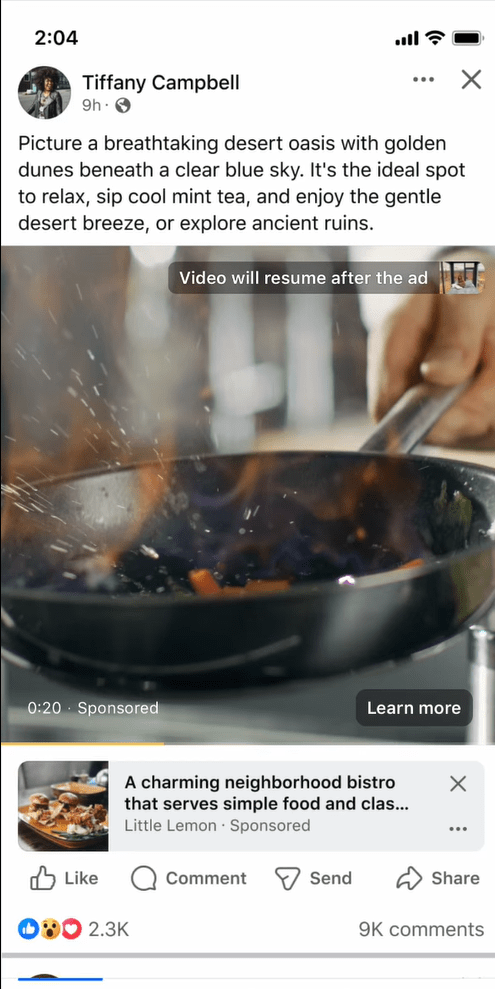
- Unlike in true instream ads that are generally set to “sound on”, accompanying content ads are set to “sound off” by default.
- Moreover, true instream ads are set to autoplay while the accompanying content ads only play when the ad is in the viewport.
In-stream Video Ads Example
1. YouTube Pre-roll Video Ads
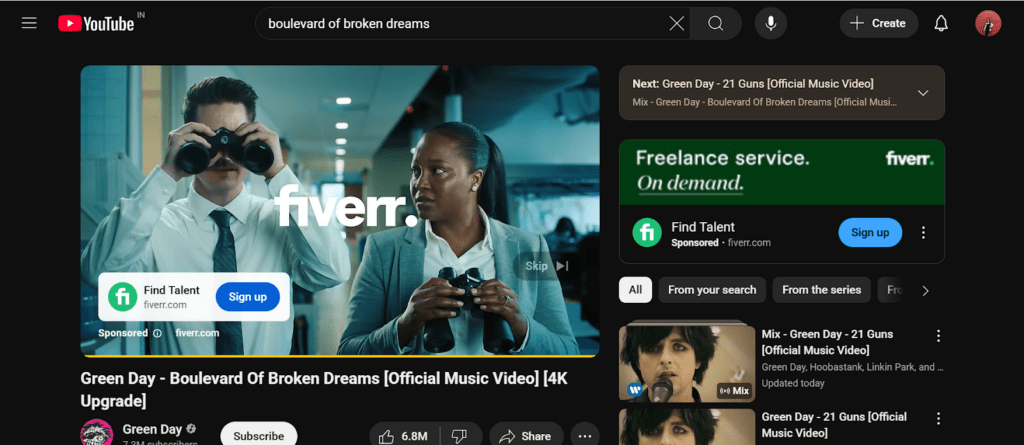
Types of Instream Video Ads
In-stream video ads can primarily be divided into two categories:
1. Linear Ads
Linear ads are the most common type of in-stream ads, temporarily pausing the main video content by taking over the entire playback area. They’re called ‘linear’ because they run in sequence with the video, much like traditional TV commercial breaks that appear before, during, or after a show.
Linear ads are further categorized into three subcategories:
- Pre-roll ads: Lasting 15-60 seconds, these ads roll in before the streaming content begins and are ideal for brand awareness. Pre-roll ads are considered to be an ideal format among advertisers for brand awareness campaigns. These ads can either be skippable or non-skippable.
- Mid-roll ads: These ads are shown in the middle of the streaming video content and capitalize on the heightened viewer attention, hence commanding higher completion and lower abandonment rates.
- Post-roll ads: These ads are displayed at the end of a streaming video. Users find them less disruptive compared to both pre-roll and mid-roll ads, as they technically do not interrupt your streaming experience.
2. Non-linear Ads
Non-linear video ads don’t interrupt playback. They are run simultaneously with the main video content, hence positioning themselves as less disruptive compared to linear formats.
Non-linear ad format can further be categorized as:
- L-banner Ads: These ads, shaped like the letter L, briefly shrink the main video while they are displayed.
- Split Screen: Here, the screen splits into two, with one half displaying a commercial while the other half continues to stream video content.
- Pause TV: These ads, in the form of static images, appear on the user’s screen a few seconds after they pause the video content.
- Overlay Ads: These are small and at times semi-transparent ads that appear on top of the existing content without blocking the entire screen.
3. Companion Ads
Companion ads don’t fall under the in-stream category but are displayed alongside video ads outside the video player. These ads are an excellent choice for advertisers who want to subtly display their message without irritating the users.
Companion ads, regardless of their placement, play a crucial role in enhancing brand visibility and combating banner blindness. They are frequently used with linear or non-linear in-stream adverts, hence the term “companion ads.”
What are the Pros and Cons of In-Stream Video Ads?
Pros
- Allows ad sequencing that let marketers decide the series of ad narration, enhancing brand affinity and
- Captures the attention of the viewers by appearing at key junctures within streaming content
- As viewers are already invested in the main video, in-stream video ads offer a higher probability of being noticed and watched till the end, offering high completion rates.
- Can be displayed as short video ad (as short as 5 seconds), which can save advertisers’ resources while delivering results
- Offers multiple targeting parameters, including behavioral, demographic, and interest-based.
Cons
- Can be considered intrusive as linear in-stream ads literally interrupt the playback to be displayed
- Technical dependency, as publishers are required to have an HTML5 video player to run them
- Can lead to ad fatigue and ad avoidance in users if deployed too frequently
- Only limited to environments where video content already exists
💬 Curious to go deeper? Use the prompt below to explore this topic with ChatGPT
Ask ChatGPT This:
Tip: Click the box to copy the question and try it in ChatGPT.
Instream Video Ads vs Outstream Video Ads
Here’s a comparison table on instream video ads vs outstream video ads.
| Factor | In-stream Ads | Out-stream Ads |
| Placement | Run within video content, such as pre-roll (before), mid-roll (during), or post-roll (after); requires a video player. | Run independently, outside of video content, like in articles, social feeds, sidebars, or in‑banner placements. |
| User Experience & Engagement | High attention capturing as users are invested in the video, but it can feel disruptive if displayed too frequently or for too long. | Less intrusive, autoplay only when in view and pause when out of view; easier to scroll past, so engagement can be lower. |
| Ad Formats | – Linear (pre, mid, post-roll)- Non-linear (overlays)- Companion ads (banners beside video) | – In-slide (sticky corner unit)- In-text (inside articles/text)- In-banner (video within banner ad) |
| Monetization Potential | Higher eCPMs due to engagement and visibility; strong fit for publishers with video libraries or OTT/CTV. | Lower eCPMs, but a broader reach and higher fill rates, as video content isn’t required. Good fit for text-heavy sites. |
| Autoplay Behavior | Plays automatically within the video stream; usually skippable only after 5 seconds. Must start with sound on (or with clear user intent). | Plays automatically when in view within non‑video content; muted by default, can be scrolled past easily. |
| Viewer Control | Limited control, as users often must watch part of the ad before skipping. | More control as users can scroll past or close the ad quickly, minimizing disruption. |
| Content Requirement | Needs video content and a compatible player; limited to video-based environments. | No existing video is required; it works on any site with text or display inventory. |
Skippable Instream Video Ads vs Non-skippable Instream Ads
| Aspect | Skippable Instream Ads | Non-skippable Instream Ads |
| General Use Case | Promote ads with flexibility; suitable for sales, leads, traffic, and awareness campaigns. | Promote ads that need to be viewed in full; best for brand awareness and consideration. |
| Ad Experience | The viewer can skip the ad after a few seconds, hence giving control over the ad experience. | The viewer must watch the whole ad, which can be seen as intrusive to some users. |
| Placement | YouTube watch pages, websites, OTT, and apps on Google video partners. | YouTube, Google video partner sites/apps, OTT; may also run on YouTube TV. |
| Bidding & Charges | CPV (pay if watched for platform-specified seconds or interacted) or impression-based (CPM, CPA, maximize conversions). | Target CPM – charged per impression (ad is always fully viewed). |
| Format Duration | Flexible, can be short or long | Must be within the limit specified by the platform to fit the standard length. |
Best Practices for Instream Video Ads
1. Content Relevance
In-stream ads work best when they match both the viewer’s interests and the content being watched. For instance, a gaming accessory ad fits naturally within a gaming video, while a fitness app ad resonates more in health-focused content. This kind of alignment boosts engagement and conversion, since the primary video content already matches with the user’s interest.
2. Video Length
A key factor in in-stream ad performance is their length and timing. Research shows that shorter ads, usually under 15 seconds, tend to deliver better results by preventing viewer fatigue and sustaining attention. While longer formats can work in specific contexts, keeping ads brief is generally the most effective way to maximize engagement.
3. Skippable over Non-skippable Instream Ads
It’s recommended to display skippable ads over non-skippable ads to retain the user’s sense of agency. Many users can find unskippable ads intrusive as they disrupt the viewing experience and remove control, often leading to frustration and ad avoidance.
Top 5 Video Players to Run In-Stream Video Ads
Here are the 5 best video players that you should consider for running instream video ads:
1. AdPushup’s FrameRate
FrameRate is AdPushup’s in-house instream player, which utilizes machine learning to fetch real-time, user-specific, and targeted bids. The video solution has user experience-focused functionalities, ensuring only high-quality videos are served to the user.
A Google policy-certified video player, it supports both in-content and floating content ads, adapting to the website’s design for a seamless user experience. The proprietary video player also utilizes custom auction logic and a dynamic floor engine to deliver user-specific targeted bids.
The player, designed to run in low-power mode without lag, displays relevant, genre-specific, lightweight videos to increase user interaction.
2. Primis
Primis is another instream video player that increases video monetization opportunities for publishers through high-quality, relevant video content.
Its AI-powered contextual recommendation engine and real-time keyword extraction framework ensure that only relevant videos that match your content are displayed on your website.
Moreover, their robust ad server, direct deal partnerships and integrated identity support ensure that each page of your website is optimized for video monetization.
3. JW Player
JW Player Connatix is a performance-oriented, industry-leading video player that offers scalable video optimization and monetization for publishers. It provides intelligent video optimization through flexible ad models, premium demand, creative formats, and in-depth audience insights, making it a powerful solution.
Serving over 18 million monthly impressions, its integrated ad server and exchange, along with next-gen SSAI and CSAI technology, ensure effective ad delivery to the right audience.
Moreover, the JW Connatix ad exchange connects publishers with leading DSPs and top brands, leading to higher eCPMs.
4. Unibots
UB Video Player is another product in the market for instream video ads. The player, powered by an advanced machine learning framework, connects publishers with leading programmatic and direct advertisers, resulting in a minimum 60% increase in ad revenue.
With adtech expertise gained over the years, the UB player delivers commendable eCPMs and fill rates with its powerful in-house optimization technologies and compliant video formats.
The instream video player collaborates with over 40 advertisers worldwide to deliver high-tier demand to publishers, enabling effective monetization.
5. Playstream
Playstream is another in-stream video player that offers server-side integration to prevent revenue loss for publishers and maintain a smooth user experience. Their video demand spans over 60 DSPs to unlock premium demand and accelerate publishers’ ad revenue growth.
Moreover, the Playstream Video Marketplace, which offers global demand, has proven to increase revenue by 60% for some prominent publishing names in the industry.
It utilizes HLS streaming for zero latency, delivering video content with perfect quality. Additionally, their vertical and interstitial video ad format offerings, along with OEM & in-app compliance, make it one of the best in the industry.
Run Video Ads with AdPushup
Has your ad revenue plateaued? Or are your eCPMs decreasing? You are in the right place. Run video ads with AdPushup and experience 5x CPMs.
With AdPushup’s Video Ads, you will get:
- Access to a dedicated Certified Ad Ops account manager.
- Get native, pre-roll, mid-roll, and post-roll video ads with our Lightweight Player.
- Natively integrate with your video player to get access to 30+ premium ad networks.
FAQs on Instream Video Ads
In-stream video ads are the ads that appear within a video stream, i.e., when a user is viewing video content. This ad format is particularly prevalent on video-streaming websites like YouTube.
Facebook pays its creators $2-$5 per thousand views on instream video ads.
A few instream video ad eligibility criteria include:
– Placement within the primary video content
– Default sound on or explicit user intent to view the video content
– IAB-prescribed ad formats for instream video ads
In-stream video ads play within a video stream that requires a dedicated HTML5 video player to display them. On the other hand, outstream ads are displayed in-between the content-heavy websites and do not require a dedicated video content library to be deployed.