We will explore high-converting AdSense formats and banner sizes for publishers in this blog. By strategically using these formats, publishers can boost ad revenue while preserving a positive user experience.
Google AdSense is one of the most accessible ways for publishers to monetize their websites. Whether you’re a blogger, publisher, or YouTuber, AdSense makes your ad space available to a vast array of advertisers from around the globe.
What makes it truly beginner-friendly is its ease of setup, cost-free access, and the ability to earn passively based on site traffic. In this blog, we will break down the top-performing and high-converting AdSense formats and banner sizes to maximize your revenue potential.
Google AdSense Ad Formats
Google AdSense offers eight advertising formats under three categories. Each ad appears differently on your website: some will take just a speck while others will appear more prominently.
1. In-page Ad Formats
In-page ads appear within the webpage of your website. These ads can appear either within the content or on either side of it.
1.1 Banner Ads
These rectangle-shaped ads by Google mainly appear in high-visibility areas. Also called display ads, these are displayed either as static display ads or in animated form. However, publishers can also choose native ads to display banner ads.
Banner ads are generally deployed to create brand awareness and drive traffic to the
website.
1.2 Multiplex Ads
Multiplex ads are a form of native ads that display multiple ad units within a single ad unit. It is a customizable ad unit wherein you can modify the style to suit your website. Publishers frequently include multiplex ad units at the end of articles or in sidebars. This is due to their ability to efficiently monetize the conclusion of a user’s journey on a page or site without being intrusive.
1.3 Related Search Ads
Related search for content allows you to show your users search phrases that are relevant to the page’s content. When a user clicks on a related search phrase, they are directed to a search results page on your site.
Including related searches on your content pages might inspire readers to explore relevant topics on your website and interact with search ads.
2. Overlay Ad Formats
Overlay Ads, as the name suggests, are a group of ad formats that appear on top of the existing website content. When placed at the bottom, they generally take 20% of the screen space without obstructing the user’s view.
2.1 Anchor Ads
Anchor ads are rectangular and are placed at the top or bottom of a web page. These ads stay in view while the user scrolls the page. These ads are primarily served on mobile devices, but they may also be displayed on desktops.
Anchor ads tend to appear on top of the user’s screen. However, when displayed at the top, they only appear when the user has scrolled down far enough to avoid covering your site’s branding or navigation.
However, being a part of Google’s Auto Ads, the smart logic automatically shifts them to the bottom of the top placement, which can affect the user experience.
2.2 Side Rail Ads
Side rail ads appear on the sides of the content as the web page is scrolled. Similar to anchor ads, side rails remain on the screen while the user scrolls. However, unlike sticky ads, they are only visible on widescreen devices such as desktops. Even yet, they only appear if the page’s margins are broad enough.
2.3 Vignette Ads
Vignette ads are Google’s improved version of interstitial ads. These full-page ads offer the same functionality with specific inline differences. For example, vignette ads appear between page loads, while interstitials appear during page transitions. Secondly, vignette ads come across as less intrusive and offer even higher CTR compared to interstitial ads.
Google has set a default frequency capping for them, which limits them to one vignette ad per unique user per hour. As long as the frequency capping is followed, these advertisements are safe to show.
3. Intent-driven Ad Formats
Ad intents is an intent-driven format that inserts links, anchors, and chips displaying organic search results and ads into current text and pages on your website that are relevant to your content. Intent-driven ads work by scanning your pages for opportunities to help users find what they’re looking for.
3.1 Ad Intent Anchors
As a user scrolls down your website, ad intent anchors appear, displaying relevant terms that your page’s visitors may be interested in. When the anchor is clicked, a window appears that shows users’ ads that are specific to the anchor they clicked, increasing your earnings. Ad intent anchors are most effective when used in conjunction with ad intent links.
3.2 Ad Intent Links
Ad intent links are hyperlinks created by AdSense from the existing language in your page’s main content (such as an article) that mentions items or other commercial opportunities. When the links are clicked, a dialogue box appears that displays ads linked to your content, which helps you earn more money.
High-Converting AdSense Formats and Banner Sizes
Desktop
1. Leaderboard (728×90)
The first AdSense banner ad size that we will be discussing here is the Leaderboard. Also called a super banner, the Leaderboard (728×90) is now the IAB-recommended replacement for the older 468×60 banner, offering better visibility and supporting modern standardization.
It is the first ad to load on a website due to its above-the-fold placement within a webpage. Due to its popularity among advertisers, this size often attracts high-quality, premium ads.
Its prominent position makes it hard to miss, while staying in harmony with your webpage’s content. Supporting both text and image formats, leaderboards are an excellent fit for forums on both desktops and tablets.
It is the second-best performing ad size after MPU. Hence, it is recommended to place one Leaderboard on every webpage to maximize your RPMs. These ads are also utilized in sponsorships and homepage takeovers. In such cases, it is ideal to display it at the exact location on every webpage. You can even align the leaderboard ad with a 300×250 ad unit for an optimized placement.
Leaderboard display sizes:
- Super Leaderboard (970×90)
- Top banner (930×180)
- Panorama (980×120)
- Billboard (970×250)
2. Large Rectangle (336×280)
The larger counterpart of the 300×250 ad unit, LREC (Large Rectangle), is popular among marketers for its exceptional AdSense performance and high eCPMs. Due to its sparse usage among other ad networks, the format was delisted by IAB in 2011. However, it has made a comeback and is becoming a mainstream ad size since 2022.
The 336×280 ad can appear in its own ad space, but it is typically put up in a multi-sized ad slot alongside a 300×250 ad. It works best when placed as in-content or at the end of your webpage content.
3. Medium Rectangle (300×250)
Medium rectangle, also called MREC or MPU, is the most popular AdSense ad unit among publishers as well as advertisers. As this ad size is widely used by advertisers alike, it typically benefits from higher demand and better fill rates, bringing in more revenue for publishers.
Moreover, the MPU is one of the few ad units that can work well both on desktops and mobiles. Also, it can be placed both within the content and the sidebars without encroaching on the webpage’s content. Even if a webpage doesn’t have many images, MPUs can be used to break the text to make the overall content more visually engaging.
Hence, the medium rectangle’s versatility makes it a popular yet expensive choice among marketers. If these compact units are used right, you can generate handsome RPMs.
Rectangle display sizes:
- Netboard (580×400)
- Triple widescreen (250×360)
- Vertical rectangle (240×400)
4. Wide Skyscraper (160×600)
The wide skyscraper, also called the super skyscraper, is another high-converting AdSense ad format that’s positioned along the webpage sidebars. It evolved from the outdated 120×600 skyscraper ad, which was retired by the IAB in 2011 due to poor performance and limited screen presence.
Its extended height give it lasting visibility throughout the scroll, reducing reliance on above-the-fold placements. Supporting text, images, and even video formats, the super skyscraper is explicitly designed for desktop environments with narrow sidebars. Its slim profile ensures it blends well with the overall layout of most websites, offering high visibility without being intrusive.
The 160×600 ad size is typically provided in a multi-size ad slot with a 120×600 ad unit, allowing for both sizes to show in the same space.
Skyscraper display sizes:
- Skyscraper (120×600)
- Portrait (300×1050)
5. Half-page (300×600)
Also called the filmstrip or Monster MPU, the half-page is a highly successful slot due to the high eCPM it commands. However, it’s still on IAB’s Rising Star List as many websites are yet to implement it.
While the 300×600 ad unit can be used on its own, it’s commonly implemented in a multi-sized ad slot that also accommodates smaller formats like the 300×250. It can also run in a 160×600 ad slot that expands left or right to fit the HPU.
Being one of the largest ad units, it is advisable to utilize the ad unit in sponsorships or for displaying video ads.
Mobile
1. Mobile Banner (300×50)
Also called a smartphone banner, the 300×50 ad unit is one of the most popular mobile-optimized ad sizes. They frequently appear as Anchor Ads on mobile sites, with the option to close them by sliding back.
As one of the most compact ad sizes, they are inexpensive to operate. Moreover, they can be instrumental for ad visibility since they can reach users at different devices than traditional desktop advertisements.
Marketers generally place it at the top or bottom of the webpage. However, publishers should prominently indicate the “close” or “skip” feature, as some visitors may find such banner ads intrusive.
2. Mobile Leaderboard (320×50)
The elder brother of the mobile banner, Mobile Leaderboard, is an IAB Mobile Standard ad unit, which is also one of the top performers on AdSense. Although it’s not a very big ad unit, the ad unit serves as an excellent way to monetize your ad impressions.
Offering flexibility to the publishers, it can be placed both at the top and at the bottom of the webpage. However, due to its slightly bigger size, the ad size can be annoying for users. So, mindful placement becomes imperative in this case for better ad experience.
3. Large Mobile Banner (300×100)
One of the top-performing AdSense ad sizes, it is the bigger counterpart of 320×50 and 300×50 ad units. Google AdSense often includes the 300×100 in a multi-size ad slot, where it may alternate with other units like 320×50 based on what’s available.
It is unlikely to be a significant income driver because it is not a high-impacted unit. This is because larger ads outperform smaller ones.
4. Mobile Interstitial (320×480)
As the name suggests, it is a full-screen ad size specifically for mobiles. The mobile interstitial was set to 320×480 as it was the screen size of iPhone 1, 3G, and 3GS. The ad size can also be utilized for mobile video ads, and the larger size of 320×50 ads.
Although the size of mobile interstitials should have been updated with time, it is still the default size in many ad networks and ad exchanges, such as Google AdX. To ensure consistent delivery, most ad platforms dim or black out the background, displaying the ad as a full-screen unit across all screen sizes.
Moreover, the mobile interstitial acts more like an overlay ad rather than a true interstitial.
Popular Banner Sizes and Formats by Country
| Ad Size | Country |
| 980×120 | Sweden and Finland |
| 980×90 | Europe |
| 950×90 | China |
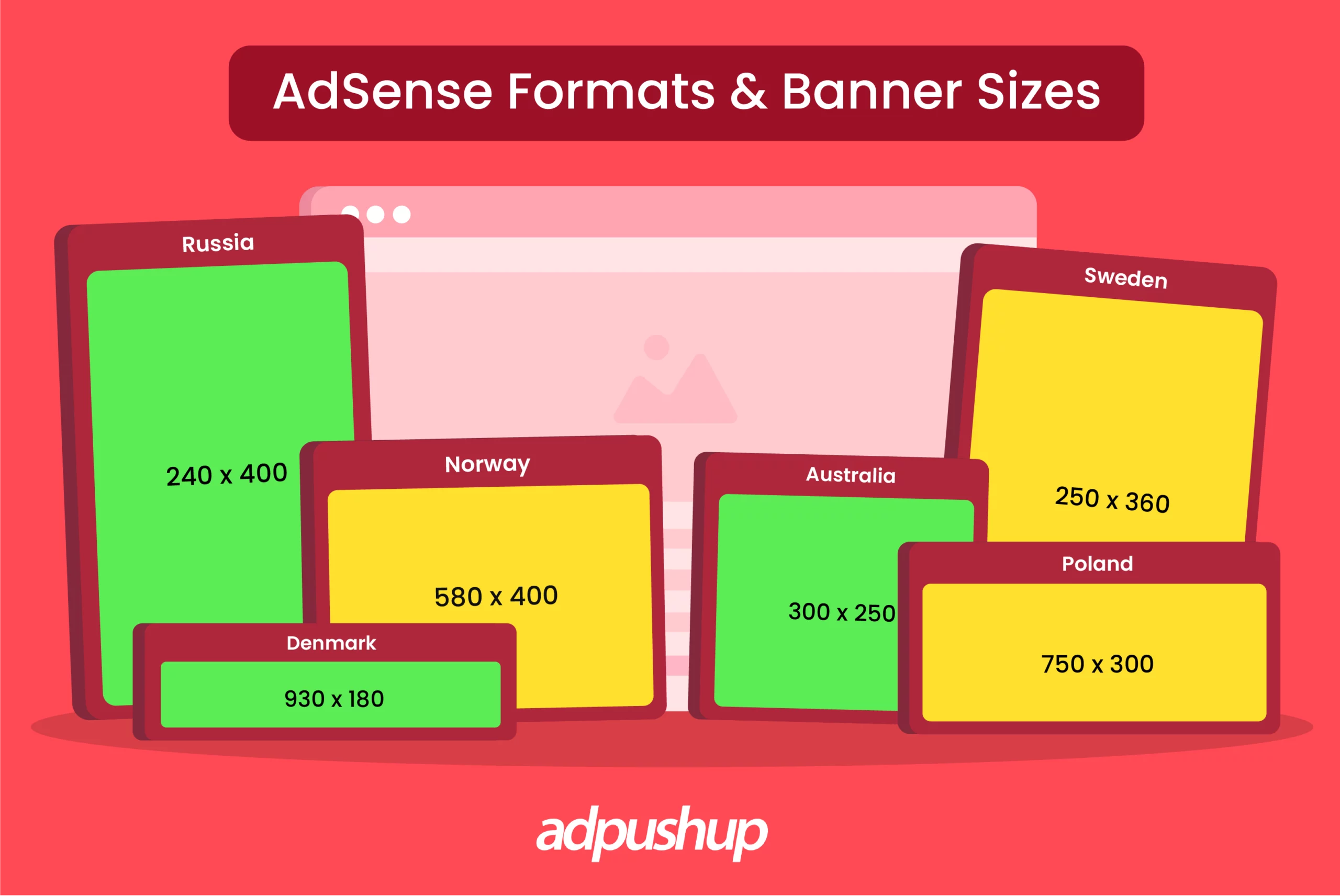
| 930×180 | Denmark |
| 750×300 | Poland |
| 750×200 | Poland |
| 750×100 | Poland |
| 580×400 | Norway |
| 250×360 | Sweden |
| 240×400 | Russia |
| 300×250 | Sweden, United Kingdom, and Australia |
Google AdSense Best Practices
Some AdSense best practices you can follow include:
- Target high-CPC keywords as they indicate high advertiser intent
- Create high-quality, unique content that adheres to the EEAT guidelines.
- Mindfully place ads above the fold for higher viewability
- Block ad categories that don’t align with your audience to focus on more profitable ads
- A/B test ad units to identify the ideal ad layout for your website
Key Takeaways: High-Converting AdSense Formats and Banner Sizes
1. Google AdSense is a free ad network that helps publishers monetize their websites through targeted ads. Ideal for beginners, AdSense requires no upfront investment and supports basic ad customization for seamless website integration. It offers in-page, overlays, and intent-driven ad formats.
2. High-performing AdSense ad sizes for desktop include Leaderboard (728×90), Large Rectangle (336×280), Medium Rectangle (300×250), Wide Skyscraper (160×600), and Half-page (300×600).
3. For mobiles, these include Mobile Banner (300×50), Mobile Leaderboard (320×50), Large Mobile Banner (300×100), and Mobile Interstitial (320×480).
Is your ad revenue stagnant? Are your ads riddled with low engagement? Fret not! Contact AdPushup now for a free demo. Our innovative banner ad formats will not only improve your RPMs, but also maintain the user experience.
FAQs: High-Converting AdSense Formats and Banner Sizes
Ad sizes like Leaderboard and medium rectangle are considered to be one of the top high-converting AdSense ad sizes.
According to Google, these are the best formats for banner ads:
– Medium rectangle (300×250)
– Large rectangle (336×280)
– Leaderboard (728×90)
– Half page (300×600)
– Large mobile banner (320×100)
Half-page, large rectangle, and Leaderboard are some of the most popular banner ad sizes.